<?xml version="1.0" encoding="utf-8"?><feed xmlns="http://www.w3.org/2005/Atom" ><generator uri="https://jekyllrb.com/" version="3.10.0">Jekyll</generator><link href="https://blog.pushover.net/rss" rel="self" type="application/atom+xml" /><link href="https://blog.pushover.net/" rel="alternate" type="text/html" /><updated>2026-04-08T21:48:51+00:00</updated><id>https://blog.pushover.net/rss</id><title type="html">Pushover Updates</title><entry><title type="html">API usage limit changes coming May 1st</title><link href="https://blog.pushover.net/posts/2026/4/app-limits" rel="alternate" type="text/html" title="API usage limit changes coming May 1st" /><published>2026-04-08T00:00:00+00:00</published><updated>2026-04-08T00:00:00+00:00</updated><id>https://blog.pushover.net/posts/2026/4/app-limits</id><content type="html" xml:base="https://blog.pushover.net/posts/2026/4/app-limits"><![CDATA[<p>Starting May 1, 2026, Pushover’s API sending limitations and capacity upgrades
will become per-account rather than per-application.</p>

<p><em>tl;dr</em> Unless you are sending many thousands of notifications per month, this
change will not affect you.</p>

<!--more-->

<h2 id="current-limits">Current limits</h2>

<p>Currently each user can register a capped number of applications and each
application is given a free quota to send 10,000 messages per month before
needing to be upgraded.
These free quotas reset on the 1st of each month.
If an application is upgraded, that higher quota only applies to that particular
application.
Teams can choose one application to assign a higher 25,000 free message limit
and all other team applications have a limit of 10,000.</p>

<p>While these free sending limits are rarely reached, we’ve heard from more
users wanting to register additional applications than users who’ve hit those
limits, whether to separate messages on their devices, give certain messages
different icons, etc.
We’ve also heard from teams that want to spread capacity upgrades across
multiple applications which is not currently possible.</p>

<h2 id="removing-application-count-limit-adding-shared-free-message-pool">Removing application count limit, adding shared free-message pool</h2>

<p>Going forward as of May 1st, users will be able to register as many applications
as they need and all applications will share the user’s pool of 10,000 free
messages per month.
Similarly, teams will be able to register as many applications as needed and all
will share the team’s free sending limit of 25,000 messages without having to
choose just one.</p>

<h2 id="pooled-capacity-upgrades">Pooled capacity upgrades</h2>

<p>Upgrades to an application’s sending quota made after May 1st will be applied to
and shared among all applications on a user’s account.
On May 1st, any stored billing information will shift to be associated with the
account rather than separately for each application.</p>

<h2 id="api-response-changes">API response changes</h2>

<p>Currently once an application’s free sending limit is reached and no
auto-upgrade is in place, additional new message requests from that application
receive an
<a href="https://pushover.net/api#response">error response</a>
from our API until the end of the month when the limit is reset.</p>

<p>After May 1st, once a user’s shared pool of free messages is reached, all
applications registered to that user will receive an error response when sending
messages until upgraded or reset.</p>

<p>The
<a href="https://pushover.net/api#limits"><code class="language-plaintext highlighter-rouge">X-Limit-App-*</code> headers</a>
our API currently returns with each request will continue to be returned but the
values will reflect the shared usage on the account/team rather than the
individual application.
Per-application usage graphs will still be available through the dashboard on
our website, with a new graph becoming available for the user-level pooled
usage.</p>

<h2 id="summary">Summary</h2>

<p>If you only receive Pushover notifications and don’t send any from your own
scripts or servers, this change will not affect you at all.
Services like IFTTT, Zapier, and our e-mail gateway are not affected by these
usage changes.</p>

<p>For those with API applications registered, you will be able to register a
higher number of them after May 1st.
Though unless your sending usage each month is very high, these changes will
likely not affect you either.</p>

<p>If you have any questions about this upcoming change, please <a href="https://pushover.net/support/contact">contact us</a>.</p>]]></content><author><name>joshua stein</name></author><summary type="html"><![CDATA[Starting May 1, 2026, Pushover’s API sending limitations and capacity upgrades will become per-account rather than per-application. tl;dr Unless you are sending many thousands of notifications per month, this change will not affect you.]]></summary></entry><entry><title type="html">New feature: Webhooks</title><link href="https://blog.pushover.net/posts/2026/2/webhooks" rel="alternate" type="text/html" title="New feature: Webhooks" /><published>2026-02-04T00:00:00+00:00</published><updated>2026-02-04T00:00:00+00:00</updated><id>https://blog.pushover.net/posts/2026/2/webhooks</id><content type="html" xml:base="https://blog.pushover.net/posts/2026/2/webhooks"><![CDATA[<p>A new feature is available today to all Pushover users: native
<a href="https://en.wikipedia.org/wiki/Webhook">Webhook</a>
support.</p>

<p>While Pushover’s own
<a href="https://pushover.net/api">Messaging API</a>
is pretty neat, there are systems and services that still don’t support it(!)
so we have our own
<a href="https://support.pushover.net/i29-e-mailing-notifications-to-your-devices">E-Mail Gateway</a>
and 3rd party services like
<a href="https://ifttt.com/">IFTTT</a>
to receive data from other places and turn it into Pushover notifications.</p>

<p>For other systems that don’t support sending e-mail (or do support it but
send mail in a strange format) but do support JSON to webhooks, you can now
create webhook receivers through the Pushover website and turn that data into
custom notifications.</p>

<!--more-->

<h2 id="creating-a-webhook">Creating a Webhook</h2>

<p>To get started, scroll down to “Your Webhooks” on your
<a href="https://pushover.net/dashboard">Pushover dashboard</a>
and click “Create a Webhook”.</p>

<p>Give it a name, and then you can skip the Data Extraction section for now unless
you know the exact format of the data the webhook will receive.
We’ll come back to that in a bit.</p>

<p>Note that unlike our E-Mail Gateway, you will need to have at least one
<a href="https://pushover.net/apps/build">application created</a>
to use as the sender of your notifications.
Like our E-Mail Gateway though, you can configure the notifications that are
generated from this source.</p>

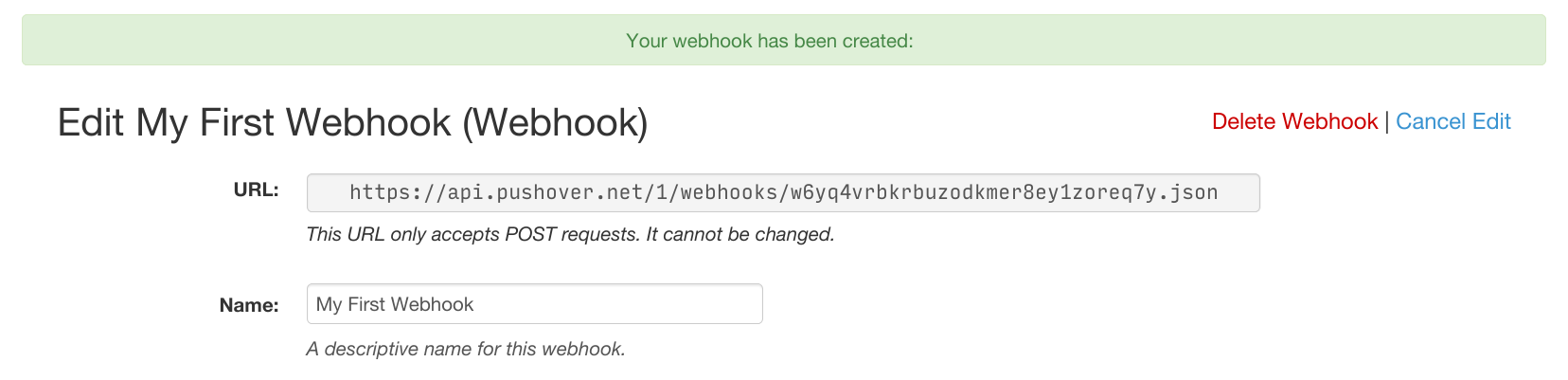
<p>Once you click “Create Webhook”, you’ll be shown the unique URL for your new
webhook receiver:</p>

<p><img src="/images/2026-02-04/url.png" alt="url" /></p>

<p>This URL can now be plugged into whatever software or system you’re configuring
to use as the receiver.
If the option is given, make sure it’s sent as a POST request.</p>

<h2 id="example-unifi-protect">Example: Unifi Protect</h2>

<p>To help explain how webhooks work, I’ll configure one in Unifi Protect.
If you run your own offline Unifi gateway and don’t have it connected to a
Ubiquiti account, you won’t be able to send notifications or e-mail from your
gateway.</p>

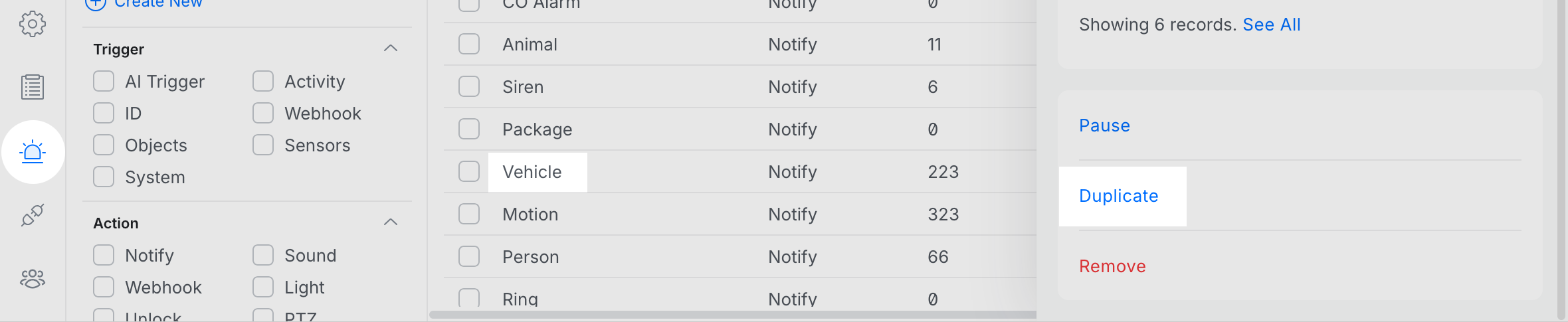
<p>In the Unifi Protect web interface, click Alarm Manager on the left sidebar.
Choose a pre-defined trigger that you want to set up and then click Duplicate on
the pop-out panel.
We’ll choose Vehicle to see when there’s any cars driving by.</p>

<p><img src="/images/2026-02-04/animal.png" alt="animal" /></p>

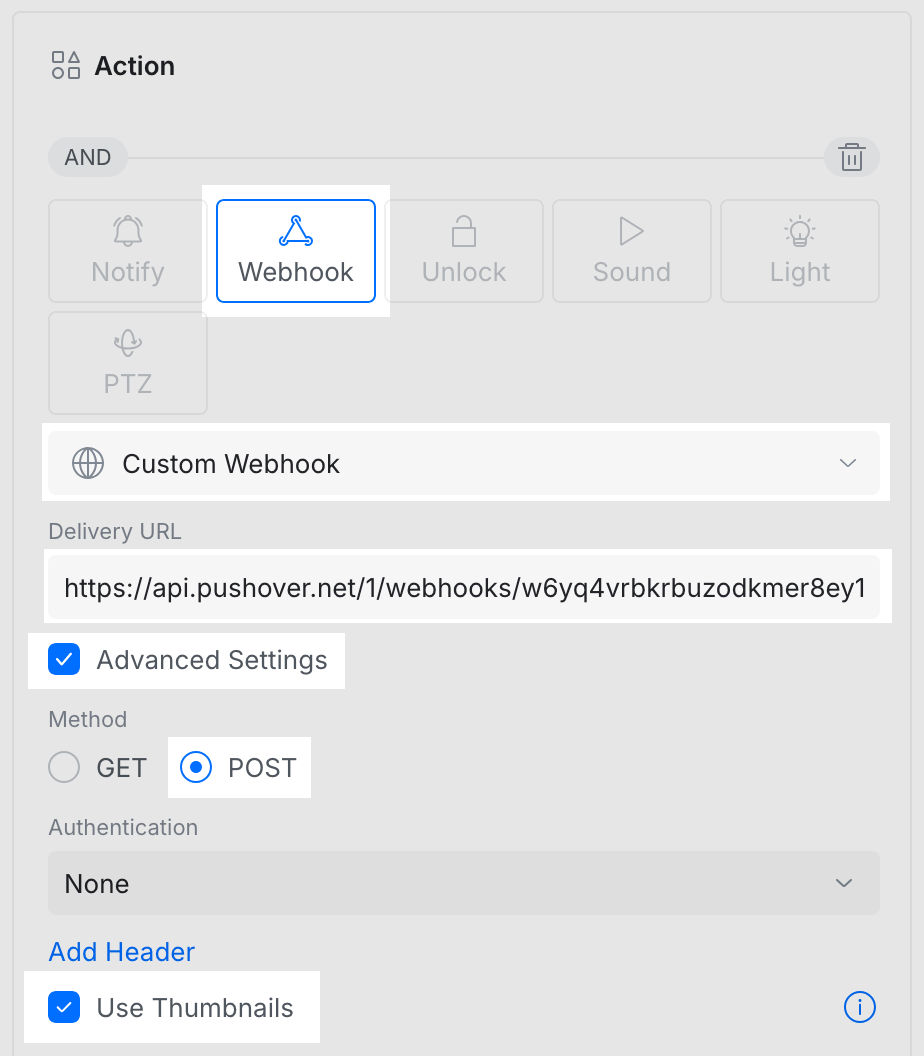
<p>In the new alarm detail screen for your duplicated alarm, under the “Action”
pane:</p>

<ul>
  <li>click “Webhook”,</li>
  <li>click “Custom Webhook”,</li>
  <li>paste your new webhook URL (received from the Pushover dashboard) in the
“Delivery URL” field,</li>
  <li>click “Advanced Settings”,</li>
  <li>click “POST”,</li>
  <li>if the alarm you’re configuring is for a security camera, enable the “Use
Thumbnails” option,</li>
</ul>

<p>Finally, click the “Create” button on the far left next to the alarm’s name.</p>

<center>
<img src="/images/2026-02-04/configure.png" width="462" height="528" />
</center>

<p>Once created, try to trigger the alarm.
(Frustratingly, the “Test Alarm” function in the Unifi dashboard does not send
the same payload data as a real alert so we might not be able to extract
everything from it.)</p>

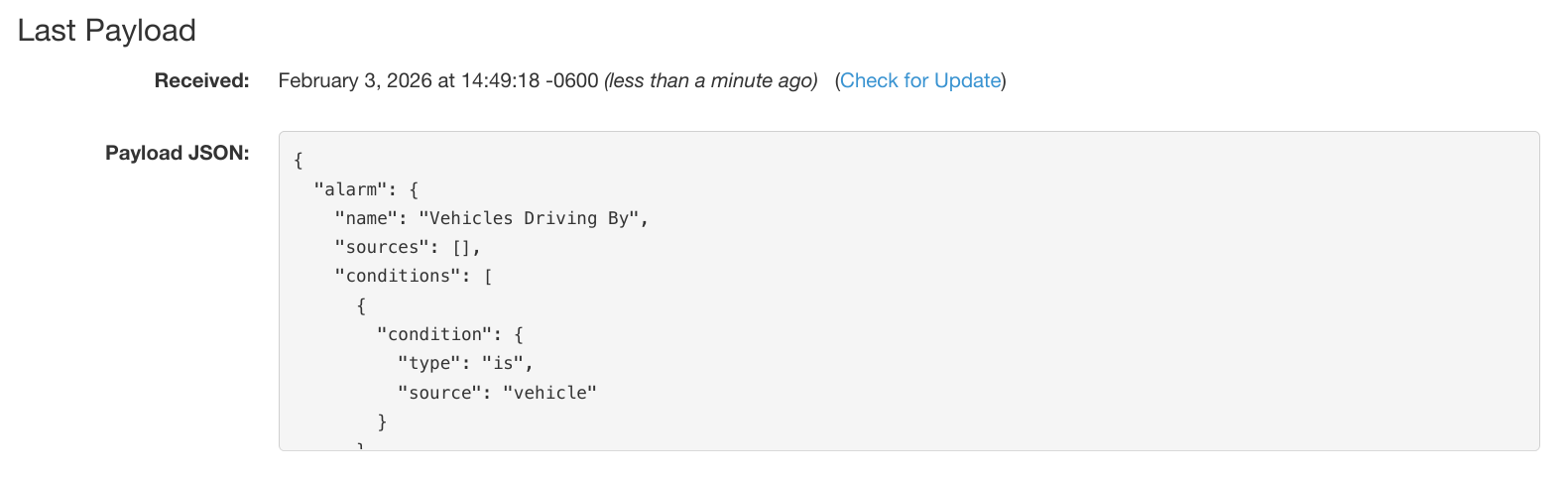
<p>Back on the Pushover dashboard at your webhook’s edit screen, click “Check
for Update” in the “Last Payload” section.
If your system successfully sent a webhook to its new URL, you will see its
latest payload data:</p>

<p><img src="/images/2026-02-04/last.png" alt="last" /></p>

<p>Now that we have a full JSON payload for working with, we can extract data from
it and create notifications.</p>

<h2 id="extracting-data">Extracting Data</h2>

<p>Each field in the final notification (title, body, URL, URL title, image) can
use data extracted from each webhook payload, and/or include static text.
Continuing with our example, we’re going to extract the title, image, and URL
linking back to our Unifi dashboard.</p>

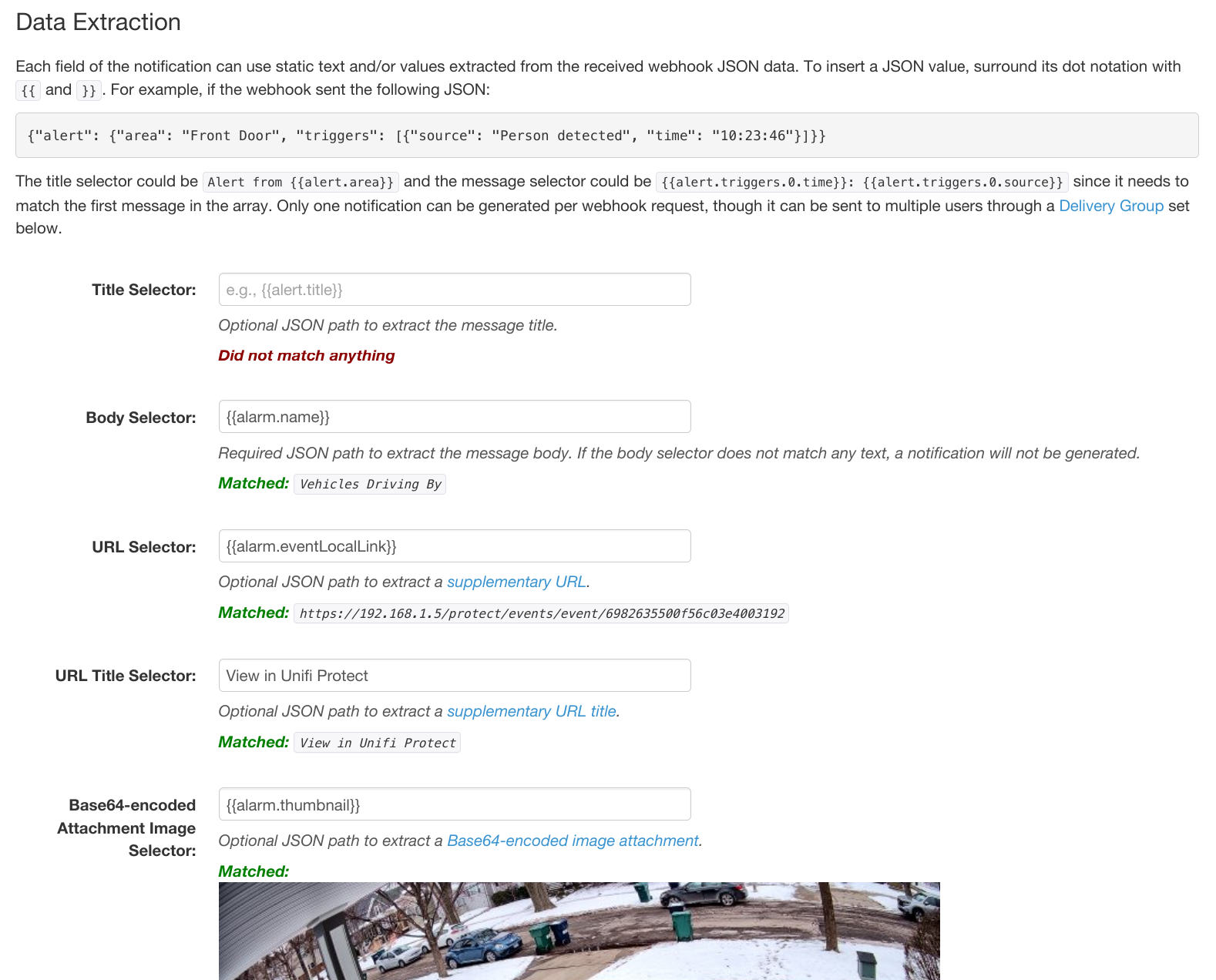
<p>For the “Body Selector” field, let’s include the name we used when creating the
alarm in Unifi Protect.
Since this comes through in the JSON as:</p>

<div class="language-plaintext highlighter-rouge"><div class="highlight"><pre class="highlight"><code>	{"alarm": {
	  "name": "Vehicles Driving",
	  ...
</code></pre></div></div>

<p>this would be represented as “<code class="language-plaintext highlighter-rouge">{</code><code class="language-plaintext highlighter-rouge">{alarm.name}</code><code class="language-plaintext highlighter-rouge">}</code>”.
Since we enabled the “Use Thumbnails” option in Unifi Protect, it included a
base64-encoded thumbnail at:</p>

<div class="language-plaintext highlighter-rouge"><div class="highlight"><pre class="highlight"><code>	{"alarm": {
	  "name": "Vehicles Driving",
	  ...
	  "thumbnail": "data:image/jpeg;...",
	  ...
</code></pre></div></div>

<p>so we can use “<code class="language-plaintext highlighter-rouge">{</code><code class="language-plaintext highlighter-rouge">{alarm.thumbnail}</code><code class="language-plaintext highlighter-rouge">}</code>” as the image.</p>

<p>At any point during this process, feel free to click the “Test Selectors on Last
Payload” button to see how the extraction works without making any changes to
your webhook.
Note that if the “Body Selector” field extracts empty text, no notification will
be sent.</p>

<p><img src="/images/2026-02-04/final.png" alt="final" /></p>

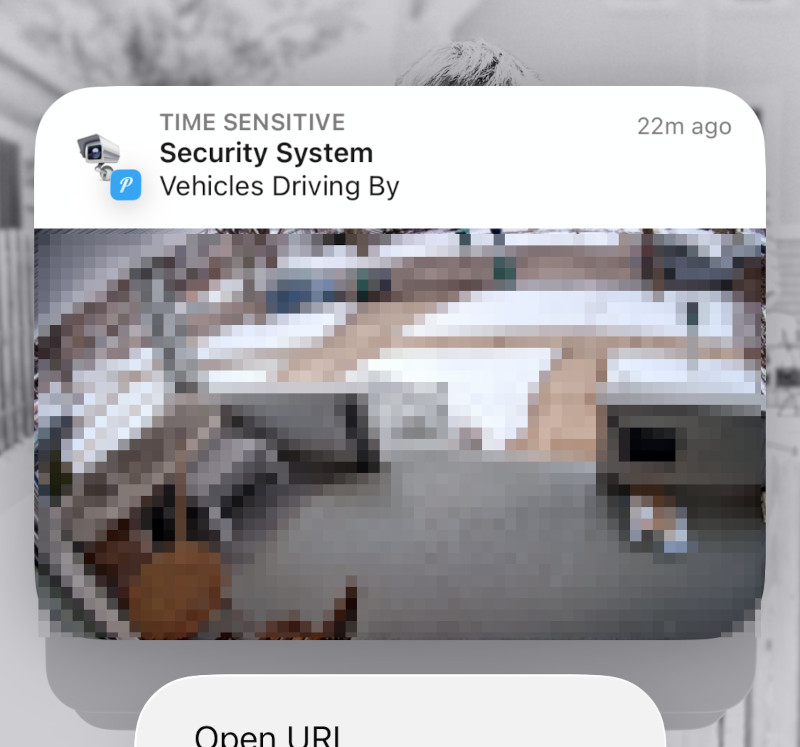
<p>Once you’re satisfied with how the data was extracted from your test payload,
click “Save Settings”.
Now the next time the webhook triggers, you should receive a Pushover
notification.</p>

<center>
<img src="/images/2026-02-04/notification.jpg" width="400" height="373" />
</center>

<p>Webhooks are available to all Pushover users today.
You can get started by logging into your
<a href="https://pushover.net/dashboard">dashboard</a>
and clicking “Create a Webhook”.</p>]]></content><author><name>joshua stein</name></author><summary type="html"><![CDATA[A new feature is available today to all Pushover users: native Webhook support. While Pushover’s own Messaging API is pretty neat, there are systems and services that still don’t support it(!) so we have our own E-Mail Gateway and 3rd party services like IFTTT to receive data from other places and turn it into Pushover notifications. For other systems that don’t support sending e-mail (or do support it but send mail in a strange format) but do support JSON to webhooks, you can now create webhook receivers through the Pushover website and turn that data into custom notifications.]]></summary></entry><entry><title type="html">Replacing AT&amp;amp;T email-to-text with Pushover notifications</title><link href="https://blog.pushover.net/posts/2025/4/att-email-text" rel="alternate" type="text/html" title="Replacing AT&amp;amp;T email-to-text with Pushover notifications" /><published>2025-04-28T00:00:00+00:00</published><updated>2025-04-28T00:00:00+00:00</updated><id>https://blog.pushover.net/posts/2025/4/att_email_text</id><content type="html" xml:base="https://blog.pushover.net/posts/2025/4/att-email-text"><![CDATA[<p>AT&amp;T has
<a href="https://www.att.com/support/article/wireless/KM1061254/">announced</a>
they are shutting down their email-to-text and text-to-email services on June
17, 2025.
If you relied on AT&amp;T’s email-to-text service to send short messages to your
phone, here’s how you can easily replace it with push notifications from
<a href="https://pushover.net/">Pushover</a>.</p>

<!--more-->

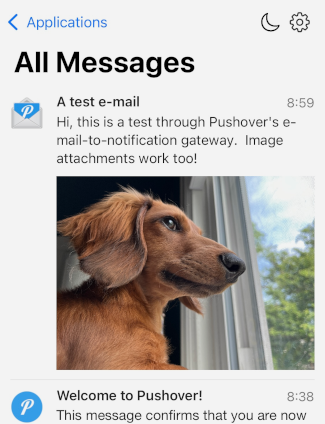
<p><img src="/images/2025-04-28/test.png" srcset="/images/2025-04-28/test.png 1x, /images/2025-04-28/test@2x.png 2x" width="325" height="424" align="right" style="margin-left: 2em;" /></p>

<h2 id="setup">Setup</h2>

<p>To get started, install the
<a href="https://pushover.net/clients/ios">Pushover for iPhone and iPad</a>
or
<a href="https://pushover.net/clients/android">Pushover for Android</a>
app from App Store or Google Play.
It’s a free download.</p>

<p>Once the app is installed, enter your e-mail address and a password, then
register your device with a name which will come into play later if you have
multiple devices (you can always change the name later).</p>

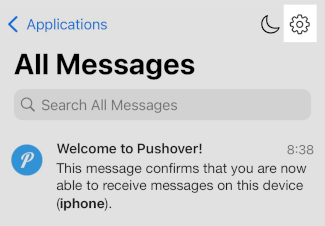
<p>At the main screen of Pushover, tap the settings icon in the upper
right corner and you’ll see your new user key and your Pushover e-mail alias.
Your unique Pushover e-mail address is all you need to get started receiving
Pushover notifications.
Tap on it to copy it to the clipboard and any e-mail sent to that address will
come through to your phone as a push notification.
That’s it!</p>

<center>
<img src="/images/2025-04-28/button.png" srcset="/images/2025-04-28/button.png
1x, /images/2025-04-28/button@2x.png 2x" width="325" height="226" />
<img src="/images/2025-04-28/alias.png" srcset="/images/2025-04-28/alias.png 1x,
/images/2025-04-28/alias@2x.png 2x" width="325" height="226" />
</center>

<p>Pushover for individuals is free to try on all your devices risk-free for 30
days with full functionality.
After 30 days, you can purchase a
<a href="https://support.pushover.net/i8-how-much-does-pushover-cost-is-there-a-subscription">Pushover
license</a>
for your device with a single one-time $4.99 USD in-app purchase and you’ll be
set for life with no subscription.
Pushover has been providing push notification services since 2012.</p>

<h2 id="configuration-and-additional-e-mail-addresses">Configuration and Additional E-Mail Addresses</h2>

<p>If you want to change settings for your e-mail alias or create additional ones,
head over to your
<a href="https://pushover.net/dashboard">Pushover dashboard</a>
and click on the new e-mail alias under Your E-Mail Aliases.</p>

<p>You can change settings such as the default
<a href="https://pushover.net/api#sound">sound</a>
played on your device when the notification is received, and you can even
<a href="https://pushover.net/sounds/build">upload your own sounds</a>.</p>

<p>The message
<a href="https://pushover.net/api#priority">priority</a>
can also be changed to -1 to send quiet notifications,
1 to send high priority notifications which can bypass any configured
<a href="https://pushover.net/settings">Quiet Hours</a>
on your account,
or priority 2 which will repeat at the configured interval to really get your
attention.
You can even configure priority 1 or 2 notifications to bypass your device’s
mute switch for really, really important notifications.</p>

<h2 id="pushover-for-teams">Pushover for Teams</h2>

<p>If your company or organization relied on AT&amp;T’s email-to-text service to send
out alerts to staff members, check out
<a href="https://pushover.net/teams">Pushover for Teams</a>
which makes it easy to manage multiple Pushover accounts and create additional
delivery groups to send to certain groups of staff with a single Pushover e-mail
alias.</p>]]></content><author><name>joshua stein</name></author><summary type="html"><![CDATA[AT&amp;T has announced they are shutting down their email-to-text and text-to-email services on June 17, 2025. If you relied on AT&amp;T’s email-to-text service to send short messages to your phone, here’s how you can easily replace it with push notifications from Pushover.]]></summary></entry><entry><title type="html">New Pushover for Teams feature: inactivity monitors</title><link href="https://blog.pushover.net/posts/2024/11/monitors" rel="alternate" type="text/html" title="New Pushover for Teams feature: inactivity monitors" /><published>2024-11-12T00:00:00+00:00</published><updated>2024-11-12T00:00:00+00:00</updated><id>https://blog.pushover.net/posts/2024/11/monitors</id><content type="html" xml:base="https://blog.pushover.net/posts/2024/11/monitors"><![CDATA[<p>A new frequently requested feature is available today for
<a href="https://pushover.net/teams">Pushover for Teams</a>
subscribers and included free with your subscription: inactivity monitors.</p>

<!--more-->

<h2 id="inactivity-monitors">Inactivity Monitors</h2>

<p>Many Pushover users utilize our service for sending alerts from
<a href="https://pushover.net/apps">network monitoring systems</a>
such as Zabbix, Nagios, and PRTG.
When a device or service is unreachable, a Pushover notification can alert
operations staff of the problem with
<a href="https://pushover.net/api#priority">customizable delivery options</a>.</p>

<p>But what happens when your network’s internet connection is down and alerts
can’t reach us, or the monitoring system itself has failed?</p>

<p>Pushover’s new Inactivity Monitors act as a “heartbeat” mechanism where your
monitoring device (or any device) pings our API every so often and when we
haven’t received a ping in a configured amount of time, a Pushover notification
is sent to your group.</p>

<p>Inactivity Monitors can also be setup for each server or device, avoiding the
need to setup a network monitor at all.
This is also helpful for networks or internal services that aren’t reachable by
an external monitoring service such as Pingdom.
Rather than having to monitor each device locally, each of your servers can just
ping our API and we’ll notify you when they stop.</p>

<h2 id="creating-a-monitor">Creating a Monitor</h2>

<p>Pushover for Teams administrators will now see an option to “<a href="https://pushover.net/monitors/build">Create a
Monitor</a>” on their team dashboard.</p>

<p><img src="/images/2024-12-12/monitor.png" alt="monitor" /></p>

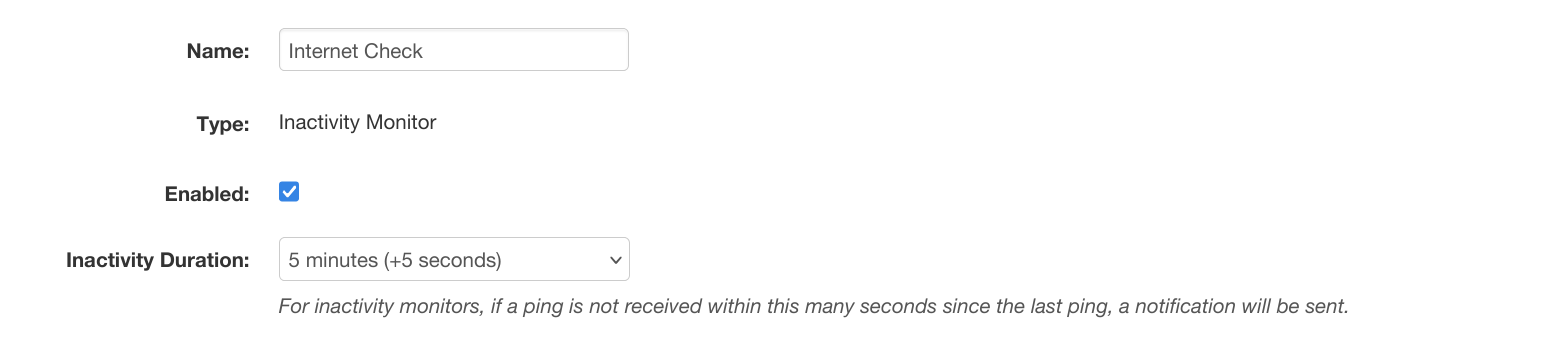
<p>Teams can create as many monitors as needed, each with their own timeouts and
alert settings.
The main setting is the inactivity duration, which determines how long we’ll
wait to receive a ping since the last one before sending an alert.</p>

<p><img src="/images/2024-12-12/monitor-timeout.png" alt="monitor-timeout" /></p>

<h2 id="alert-options">Alert Options</h2>

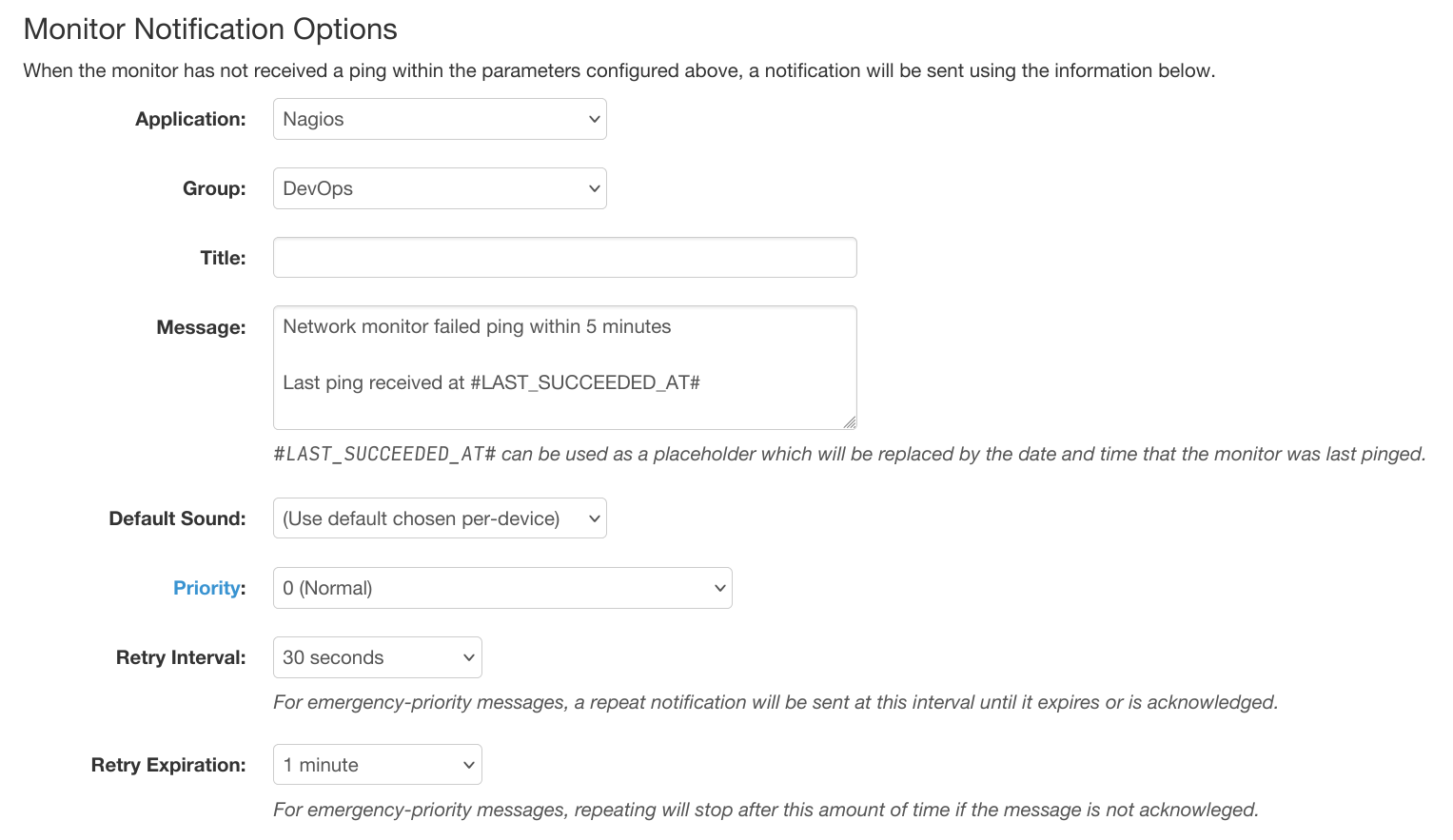
<p>When our API has failed to receive a ping at the URL we provide in the
configured amount of minutes, we’ll generate a notification to the group you
choose with all of the options you’ve configured:</p>

<p><img src="/images/2024-12-12/monitor-settings.png" alt="monitor-settings" /></p>

<p>Once an alert is sent for an inactive device, we won’t alert for it again for
future missed pings until it pings again.</p>

<p>Inactivity Monitors are available today for all
<a href="https://pushover.net/teams">Pushover for Teams</a>
subscribers.
We hope you find this feature useful and we’ll be introducing additional monitor
types in the future.
We’d love to hear your
<a href="https://pushover.net/contact">feedback</a>
and
<a href="https://support.pushover.net/s1-pushover/ideas">feature suggestions</a>.</p>]]></content><author><name>joshua stein</name></author><summary type="html"><![CDATA[A new frequently requested feature is available today for Pushover for Teams subscribers and included free with your subscription: inactivity monitors.]]></summary></entry><entry><title type="html">Upcoming discontinuation of SMS backup delivery</title><link href="https://blog.pushover.net/posts/2024/1/sms" rel="alternate" type="text/html" title="Upcoming discontinuation of SMS backup delivery" /><published>2024-01-18T00:00:00+00:00</published><updated>2024-01-18T00:00:00+00:00</updated><id>https://blog.pushover.net/posts/2024/1/sms</id><content type="html" xml:base="https://blog.pushover.net/posts/2024/1/sms"><![CDATA[<p>Later this year, Pushover will be discontinuing our SMS Backup Delivery
mechanism for Pushover for Teams subscribers receiving
<a href="https://pushover.net/api#priority2">emergency-priority</a>
messages.</p>

<p>While only 6% of Pushover for Teams users are utilizing SMS Backup Delivery, we
understand that it is an important failsafe for certain users.
However, our mobile applications have gained functionality in recent years
that makes SMS backup delivery less of a requirement, as we’ll detail below.</p>

<!--more-->

<h2 id="timeline">Timeline</h2>

<p>On <strong>April 1, 2024</strong>, our website will no longer allow new SMS numbers to be
added to Pushover accounts but <strong>we will continue delivering</strong> to existing SMS
numbers until July 1st.</p>

<p>On <strong>July 1, 2024</strong>, we will <strong>stop sending SMS messages altogether</strong> and will
only retry delivery by push notification.
Existing SMS phone numbers on file will be deleted.</p>

<p><em>Please note that if per-country restrictions detailed below are imposed before
these dates, we may have to stop SMS delivery in those countries.</em></p>

<h2 id="why-is-sms-backup-being-discontinued">Why is SMS Backup Being Discontinued?</h2>

<p>In the six years since Pushover for Teams launched with SMS Backup Delivery,
mobile phone providers worldwide have greatly tightened restrictions on SMS
delivery to combat spam and fraud.
While mostly well-intentioned, these restrictions make it difficult and costly
for small businesses like Pushover to send legitimate SMS messages to our
customers who have opted into receiving them.</p>

<p>Many countries have also imposed restrictions on leasing local phone numbers
(called “long codes”), requiring that we have a local presence in each of these
countries where we want to use a local phone number.
While not strictly necessary, we have tried to acquire local numbers in many
countries where we have users so they don’t have to send a reply SMS to a number
in another country which can be expensive.</p>

<p>Mobile phone providers and SMS services like the one we use are pushing
companies to purchase “short codes” (5-6 digit numbers) for automated SMS
delivery rather than the country-specific “long codes” we are currently using.
Unfortunately the cost of acquiring and leasing a short code is extremely
expensive and laborious, especially as carriers in each country where we want to
deliver messages each impose large monthly fees which would greatly eclipse all
of the revenue generated by our Pushover for Teams service as a whole.</p>

<h2 id="push-notification-enhancements">Push Notification Enhancements</h2>

<p>While SMS Backup Delivery has been useful in increasingly-rare situations where
mobile data service is unavailable but mobile phone service is, the most popular
use of our SMS Backup has been to bypass a device’s mute switch by creating a
contact for our local phone number and setting it to be allowed to play sounds
when the device is muted.
In recent years, Pushover’s mobile apps for Android and iOS have gained the
ability to do this without SMS delivery.</p>

<p>On Android, our app has the ability to play sounds for emergency-priority
messages through the device’s alarm channel, just as an alarm clock application
does.
Our application can also be specifically
<a href="https://support.pushover.net/i258-overriding-do-not-disturb-on-android">permitted</a>
to bypass Do Not Disturb.</p>

<p>On iPhone and iPad, our application was granted a special entitlement by Apple
to generate Critical Alerts which are notifications that bypass the device’s
mute switch with a specified volume.</p>

<h2 id="support">Support</h2>

<p>If you have any questions or concerns about the upcoming removal of SMS Backup
Delivery, please
<a href="https://pushover.net/support">contact Pushover support</a>.</p>]]></content><author><name>joshua stein</name></author><summary type="html"><![CDATA[Later this year, Pushover will be discontinuing our SMS Backup Delivery mechanism for Pushover for Teams subscribers receiving emergency-priority messages. While only 6% of Pushover for Teams users are utilizing SMS Backup Delivery, we understand that it is an important failsafe for certain users. However, our mobile applications have gained functionality in recent years that makes SMS backup delivery less of a requirement, as we’ll detail below.]]></summary></entry><entry><title type="html">A note about notification encryption and privacy</title><link href="https://blog.pushover.net/posts/2023/12/encryption" rel="alternate" type="text/html" title="A note about notification encryption and privacy" /><published>2023-12-10T00:00:00+00:00</published><updated>2023-12-10T00:00:00+00:00</updated><id>https://blog.pushover.net/posts/2023/12/encryption</id><content type="html" xml:base="https://blog.pushover.net/posts/2023/12/encryption"><![CDATA[<p>In the news recently is a
<a href="https://www.reuters.com/technology/cybersecurity/governments-spying-apple-google-users-through-push-notifications-us-senator-2023-12-06/">report</a>
that “foreign officials were demanding [push notification] data from
Alphabet’s Google and Apple”.</p>

<p>While we have no knowledge of any targeting of push notification data of our
customers, we have had some questions about how we deliver push notifications
and what data is made available to Google and Apple.</p>

<!--more-->

<h2 id="pushover-notifications-are-encrypted">Pushover Notifications are Encrypted</h2>

<p>Since 2015, Pushover’s
<a href="https://pushover.net/clients/ios">iPhone/iPad</a>
and
<a href="https://pushover.net/clients/android">Android</a>
apps have
<a href="https://support.pushover.net/i46-are-messages-notifications-encrypted">supported notification payload
encryption</a>,
and enforced it for all devices as of 2019.
Pushover’s desktop client only
<a href="https://pushover.net/api/client#websocket">communicates directly</a>
with Pushover’s servers over TLS, though macOS desktop notifications (registered
through Safari) are processed directly by macOS and cannot be encrypted.
This is changing for macOS with the recent availability of
<a href="https://developer.apple.com/documentation/usernotifications/sending_web_push_notifications_in_web_apps_and_browsers">W3C Web
Push</a>
in Safari, which can be used now with our
<a href="https://pushover.net/clients/desktop">web push beta</a>,
as it allows some client-side processing of notification data before the
operating system displays it.</p>

<p>This encryption for iOS and Android is activated at device registration time by
the device generating a secret key and sending it directly to Pushover’s API
servers over a standard TLS-encrypted connection.
When Pushover’s servers receive a new message for a device, our servers encrypt
the title, message body, URL, and all other message metadata with that device’s
secret key and send it over a TLS-encrypted connection to Apple’s (APNS) or
Google’s (HTTPS) push notification servers.
The only data that Apple or Google can see through their push notification
servers is an encrypted string, for which they do not have the decryption key.</p>

<p>Once the device receives an encrypted push notification, it is handed off to the
Pushover application’s notification handler which then decrypts it using its
stored key, and hands it back to the operating system as a notification to
display on the screen.
This also allows our application to download any image attachments or custom
sounds directly from our API, again over a standard TLS-encrypted connection.</p>

<p>If you have ever received a Pushover notification on iOS after restarting your
device but before unlocking it, your Pushover notification will have shown
“<em>[Could not decrypt notification. Please open the Pushover app to unlock.]</em>”
This is because iOS had not yet unlocked access to the application’s settings
which include its decryption key, so the notification could not be decrypted.</p>

<p>If you have any further questions about Pushover’s security or privacy, please
feel free to
<a href="https://pushover.net/support">contact us</a>.</p>]]></content><author><name>joshua stein</name></author><summary type="html"><![CDATA[In the news recently is a report that “foreign officials were demanding [push notification] data from Alphabet’s Google and Apple”. While we have no knowledge of any targeting of push notification data of our customers, we have had some questions about how we deliver push notifications and what data is made available to Google and Apple.]]></summary></entry><entry><title type="html">Pushover 4.0: expiring messages, new apps view, supporting development</title><link href="https://blog.pushover.net/posts/2023/7/expiring-messages" rel="alternate" type="text/html" title="Pushover 4.0: expiring messages, new apps view, supporting development" /><published>2023-07-10T00:00:00+00:00</published><updated>2023-07-10T00:00:00+00:00</updated><id>https://blog.pushover.net/posts/2023/7/expiring_messages</id><content type="html" xml:base="https://blog.pushover.net/posts/2023/7/expiring-messages"><![CDATA[<p>Pushover 4.0 for
<a href="https://pushover.net/clients/android">Android</a>,
<a href="https://pushover.net/clients/ios">iOS</a>,
and
<a href="https://pushover.net/clients/desktop">Desktop</a>
is out now and adds a new look and support for a new message expiration
function.</p>

<!--more-->

<h2 id="new-apps-view">New Apps View</h2>

<div style="float: right; margin-left: 2em;">
<img src="/images/2023-07-10/apps.png" width="230" height="299" />
</div>

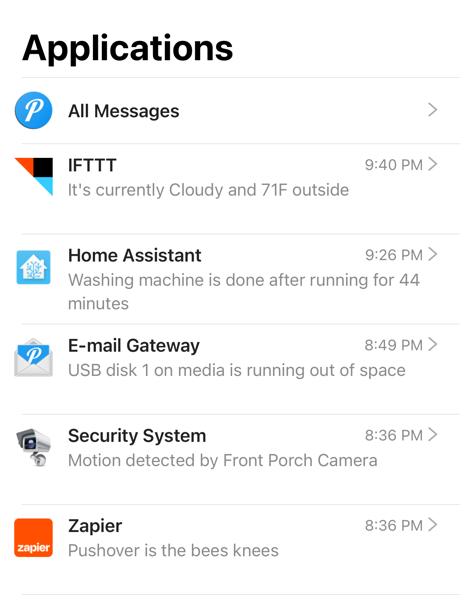
<p>When swiping right on the message list to show the list of applications that
have sent messages, the list is now sorted by the latest sender, and under each
source is a snippet of the latest message.</p>

<p>This view is inspired by the Messages application on iOS and makes it easier to
see the newest message from each application rather than having to scroll
through the list of All Messages.</p>

<p>On iOS, our application and message lists now use the updated header style
introduced in iOS 11 but took… a while to get used to.</p>

<div style="clear: both;"></div>

<h2 id="expiring-messages">Expiring Messages</h2>

<p>A new feature supported by our API and our new apps is
<a href="https://pushover.net/api#ttl">Expiring Messages</a>.</p>

<p>Setting the Time To Live (<code class="language-plaintext highlighter-rouge">ttl</code> parameter) on a message sent to our API sets the
maximum lifetime of the message in seconds.
After that many seconds have passed since the message is received by our API,
the message will automatically delete from the devices it was sent to.
On Android and Desktop, notifications from these messages will automatically
expire and remove themselves from the notification center.</p>

<p>Unfortunately due to limitations on iOS, notifications can only expire once
another notification has been received (or when the Pushover app is opened),
since that is the only opportunity our app extension gets to clean up expired
notifications.
We’ve applied for a
<a href="https://developer.apple.com/documentation/bundleresources/entitlements/com_apple_developer_usernotifications_filtering">special
entitlement</a>
from Apple to support this but have not yet been approved.</p>

<p>On all platforms, expired messages delete from the message list automatically.
This makes it a handy feature for unimportant messages that are only useful
for a short timeframe, such as notifications about open doors from a security
system.</p>

<h2 id="support-development">Support Development</h2>

<p>And finally, our iOS and Android apps now also support directly supporting
Pushover development with optional in-app purchases.
For over
<a href="/posts/2022/3/ten">ten years</a>,
purchasing a lifetime of Pushover notifications has remained a single one-time
in-app purchase for individuals with no monthly or yearly costs.</p>

<p>Many users having paid once many years ago still rely on Pushover every day and
have asked for a way to “re-up” their purchase and contribute to Pushover’s 
continued development.
Our iOS and Android apps now have a screen in the settings menu that enables
in-app purchases beyond the initial one-time license purchase.
These tips are of course completely optional but greatly appreciated and go
toward Pushover’s monthly server costs and continued development.</p>]]></content><author><name>joshua stein</name></author><summary type="html"><![CDATA[Pushover 4.0 for Android, iOS, and Desktop is out now and adds a new look and support for a new message expiration function.]]></summary></entry><entry><title type="html">Pushover turns 10</title><link href="https://blog.pushover.net/posts/2022/3/ten" rel="alternate" type="text/html" title="Pushover turns 10" /><published>2022-03-07T00:00:00+00:00</published><updated>2022-03-07T00:00:00+00:00</updated><id>https://blog.pushover.net/posts/2022/3/ten</id><content type="html" xml:base="https://blog.pushover.net/posts/2022/3/ten"><![CDATA[<p>Hi, I’m joshua stein, the proprietor of
<a href="https://pushover.net/">Pushover</a>.
10 years ago this week, I officially launched the Pushover app on the
<a href="https://pushover.net/clients/ios">Apple App Store</a>
and
<a href="https://pushover.net/clients/android">Google Play</a>
(back then called Android Market) and since then, support for Pushover’s API has
been integrated into countless services, products, open-source libraries, and
one-off shell scripts and tools.
To date, Pushover has delivered over 3 billion notifications to over 3/4 of a
million users.</p>

<!--more-->

<p>Many users may not know it, but Pushover has always been a solo venture, being
developed, run, and supported by just one person with no outside funding.
What started as a side project to send alerts from my network monitoring script
for my consulting services quickly grew into a full-time business.
(Don’t worry, this is not about our
<a href="https://ourincrediblejourney.tumblr.com/">Incredible Journey</a> together.)
So today, I just wanted to thank every Pushover user that has used the service
in the past decade, whether you rely on it every day or whether you hated it and
left it a 1-star review on the App Store.
Pushover continues to thrive and evolve because of its users and the valuable
feedback and encouragement I receive from you every day, and of course, because
of other software developers that integrate Pushover into their projects.
I continue to be fascinated by the creative uses people have come up with for
Pushover.</p>

<h3 id="10-years-of-pushover">10 Years of Pushover</h3>

<div style="float: right; margin-left: 2em;">
<img src="/images/2022-03-07/ios5.png" />
</div>

<p>In early 2012 when Pushover launched, the iPhone 4S and the Galaxy Nexus were
the latest-and-greatest phones.
iOS 5 had a very glossy appearance and Siri was just about as bad then as it is
now.</p>

<p>Pushover was initially a paid app in the App Store and Android Market, but
eventually became free-to-try with a one-time in-app purchase licensing that
platform forever.
Many of Pushover’s earliest users are still using it today after paying $4.99
ten years ago, and I hope those users will still be using it in 2032 on their
iPhone 26.</p>

<p>The launch of
<a href="https://pushover.net/teams">Pushover for Teams</a>
in 2017 helped expand the reach of Pushover into larger companies and
organizations that needed centralized management which in turn helped Pushover
become more sustainable.</p>

<p>Pushover’s infrastructure has grown in size over the years and while it’s always
run on dedicated bare-metal servers, they’ve moved around between network
providers and across geographic locations.
I’m proud of the service’s
<a href="https://status.pushover.net/">uptime</a>
which has always been fairly consistent over the years, although some DDoS
attacks in 2019 forced Pushover to need an anti-DDoS proxying service.
I greatly appreciate the support and understanding I receive from users when
things get a little rocky.</p>

<h3 id="the-push-notification-landscape">The Push Notification Landscape</h3>

<p>As iOS and Android have evolved over the past decade, Pushover has kept pace
with their constantly updating notification mechanisms.
New iOS functionality in 2015 allowed Pushover to support encryption for all
push notifications between Pushover and each user’s device, and in 2018 I was
able to add support for image attachments that could be rendered directly in the
notification.
In 2020, Pushover on iOS was granted a Critical Alert entitlement allowing
high-priority notifications to bypass the device’s mute switch (if the user
enabled it), something that’s been possible on Android since 2013.
Last year, Pushover finally gained support for custom sounds on all three
platforms after a recent iOS change made it possible, which was a constant
feature request almost since the beginning of the service.</p>

<p>As was probably to be expected, push notifications as a concept have became a
source of irritation and spam in recent years, with many apps and websites
trying to use them to send marketing messages and nagging users for engagement
(even from some of Apple’s own apps).
While Pushover has a zero-tolerance policy for spam, it’s never been an issue
for the service due to users having to opt-in to Pushover notifications by
supplying their randomly-generated user key.</p>

<p>However, it’s clear that Apple and Google are taking a much more aggressive
stance on annoying notifications lately, with new features like Do Not Disturb,
Focus, and Time-Sensitive notifications.
I’m confident Pushover will be able to adapt to new restrictions or other
changes in future platform updates, and with any luck, the more annoying users
of push notifications will not be and will have to stop abusing them.</p>

<h3 id="thanks">Thanks</h3>

<p>In closing, I just want to reiterate my thanks to everyone that has used
Pushover and continues to advocate for it at their company, recommend it to a
friend, or add support for it in their open-source project.
I’m grateful that I’ve been able to operate this business for the past decade
and I hope to be able to keep evolving Pushover over the years to come.</p>

<blockquote>
<em>joshua stein</em><br />
Owner of Pushover, LLC
</blockquote>]]></content><author><name>joshua stein</name></author><summary type="html"><![CDATA[Hi, I’m joshua stein, the proprietor of Pushover. 10 years ago this week, I officially launched the Pushover app on the Apple App Store and Google Play (back then called Android Market) and since then, support for Pushover’s API has been integrated into countless services, products, open-source libraries, and one-off shell scripts and tools. To date, Pushover has delivered over 3 billion notifications to over 3/4 of a million users.]]></summary></entry><entry><title type="html">Custom sounds</title><link href="https://blog.pushover.net/posts/2021/3/custom-sounds" rel="alternate" type="text/html" title="Custom sounds" /><published>2021-03-31T00:00:00+00:00</published><updated>2021-03-31T00:00:00+00:00</updated><id>https://blog.pushover.net/posts/2021/3/custom_sounds</id><content type="html" xml:base="https://blog.pushover.net/posts/2021/3/custom-sounds"><![CDATA[<p>Today I’m happy to announce the release of Pushover 3.7 for
<a href="https://pushover.net/clients/android">Android</a>,
<a href="https://pushover.net/clients/ios">iPhone/iPad</a>,
and
<a href="https://pushover.net/clients/desktop">Desktop</a>
with custom sound support!</p>

<p>While Pushover has long included
<a href="https://pushover.net/api#sounds">21 different sounds</a>
that can be selected per-message through our API, a common feature request was
the ability to play custom notification sounds stored on a user’s device.
This was technically possible on Android but there was no ability to do it on
iPhone/iPad, and on Android there was no way to choose between different sounds
on a user’s device through the API.</p>

<!--more-->

<p>Recently Apple added the ability to play notification sounds that were not
bundled with the app, and added support for playing MP3 files.
With the release of Pushover 3.7 today, you can now upload custom sounds through
our website and have them played on your devices without having to copy sound
files to each device.
Developers using our
<a href="https://pushover.net/api">API</a>
can even play those sounds on other users’ devices that they send to, allowing
applications to have distinct notification sounds shared by all of their users.</p>

<p>This functionality is available on our Desktop client, all Android devices, and
iPhone/iPad devices running iOS 14.</p>

<h3 id="uploading-sounds">Uploading Sounds</h3>

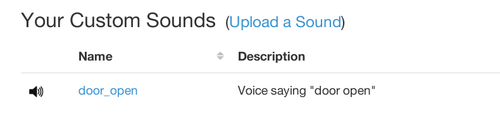
<p>To get started, head over to your
<a href="https://pushover.net/dashboard">dashboard</a>
and you’ll now see a new section “Your Custom Sounds”.</p>

<center>
<img src="/images/sounds-dashboard.png" />
</center>

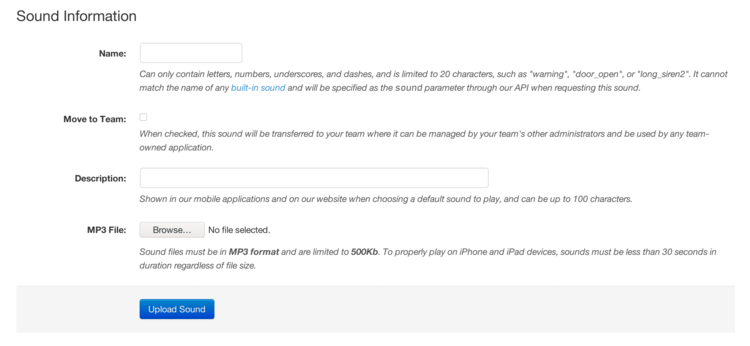
<p>Click <strong>Upload Sound</strong> and then enter a name, description, and select an MP3
file from your computer.
Note that this name is the one that will be specified through our API with the
<code class="language-plaintext highlighter-rouge">sound</code> parameter.
For Pushover for Teams administrators, you can optionally share the sound file
with your whole team and its applications.</p>

<center>
<img src="/images/sounds-info.png" />
</center>

<p>Also note that sound files must be in MP3 format and are limited to 500
kilobytes in size, and for iOS devices, cannot be longer than 30 seconds or they
will not play.
If you have an MP3 that needs to be trimmed in size, we recommend the free
utility
<a href="https://ringer.org/">Ringer</a>.
If it’s still larger than 500Kb, we recommend using a utility like
<a href="https://www.mp3smaller.com/">MP3Smaller</a>
to reduce the sound quality.
Since these are just short sounds played over a phone’s small speaker, the sound
quality is not that important.</p>

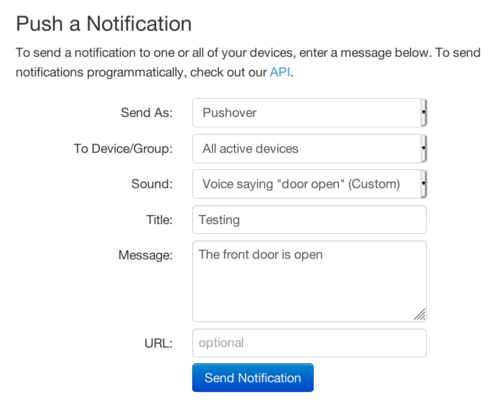
<p>Once you have a sound file uploaded, and your devices have been updated to
Pushover 3.7, try sending it to your device through our dashboard by selecting
it as the <strong>Sound</strong> parameter.</p>

<center>
<img src="/images/sounds-send.png" />
</center>

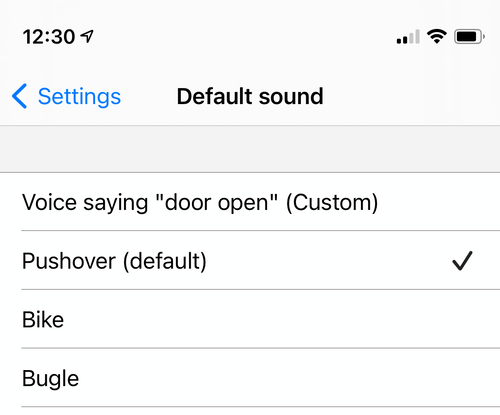
<p>Uploaded sounds are also available to be chosen as your default normal- and
high-priority sounds in our apps:</p>

<center>
<img src="/images/sounds-ios.png" />
</center>

<p>I hope you enjoy this new feature.
Pushover 3.7 is available now for
<a href="https://pushover.net/clients/android">Android</a>,
<a href="https://pushover.net/clients/ios">iPhone/iPad</a>,
and
<a href="https://pushover.net/clients/desktop">Desktop</a>.</p>]]></content><author><name>joshua stein</name></author><summary type="html"><![CDATA[Today I’m happy to announce the release of Pushover 3.7 for Android, iPhone/iPad, and Desktop with custom sound support! While Pushover has long included 21 different sounds that can be selected per-message through our API, a common feature request was the ability to play custom notification sounds stored on a user’s device. This was technically possible on Android but there was no ability to do it on iPhone/iPad, and on Android there was no way to choose between different sounds on a user’s device through the API.]]></summary></entry><entry><title type="html">Free trial now 30 days instead of 7</title><link href="https://blog.pushover.net/posts/2021/2/free-trial-now-30-days-instead-of-7" rel="alternate" type="text/html" title="Free trial now 30 days instead of 7" /><published>2021-02-11T00:00:00+00:00</published><updated>2021-02-11T00:00:00+00:00</updated><id>https://blog.pushover.net/posts/2021/2/free-trial-now-30-days-instead-of-7</id><content type="html" xml:base="https://blog.pushover.net/posts/2021/2/free-trial-now-30-days-instead-of-7"><![CDATA[<p>Over the years we’ve heard from some users that our 7-day trial was not long
enough to really test out Pushover.
Sometimes users would install the app, signup, and then forget about it, only to
return to it days later and find that their trial was about to expire.
Or users integrating Pushover with a custom IoT project would need a few more
days to get their software properly setup to send out notifications.</p>

<p>Today we’re happy to announce that we’re changing our free trial period for
Android, iOS, and Desktop platforms to 30 days.
As soon as a device on a particular platform is added to a Pushover account, the
30-day trial period for that platform begins.
Each of our Android, iOS, and Desktop platforms can be tried out independently
or together.</p>

<!--more-->

<p>If you need more time on your free trial before buying, just
<a href="https://pushover.net/support/contact">let us know</a>
and we’ll be happy to extend your trial period.</p>

<p>We hope this lets more users try out Pushover and see how easy it is to
integrate and use. We have some exciting things coming up this year for
Pushover, so stay tuned!</p>]]></content><author><name>joshua stein</name></author><summary type="html"><![CDATA[Over the years we’ve heard from some users that our 7-day trial was not long enough to really test out Pushover. Sometimes users would install the app, signup, and then forget about it, only to return to it days later and find that their trial was about to expire. Or users integrating Pushover with a custom IoT project would need a few more days to get their software properly setup to send out notifications. Today we’re happy to announce that we’re changing our free trial period for Android, iOS, and Desktop platforms to 30 days. As soon as a device on a particular platform is added to a Pushover account, the 30-day trial period for that platform begins. Each of our Android, iOS, and Desktop platforms can be tried out independently or together.]]></summary></entry></feed>